Bot RoK trên LDPlayer vs BlueStacks vs MEmu 2026 — Emulator Nào Compatible RokdBot
2026-05-21 · 8 phút
Bot RoK chọn emulator sai = ban risk + crash + waste 900K subscription
90% RokdBot user setup hỏi cùng câu: "Dùng emulator nào với bot?". Chọn sai = 3 vấn đề:
- Bot không compatible (BlueStacks 5 không work với BoostBot per official docs)
- Crash mid-grind (RAM overload khi multi-instance)
- Detection signal up (emulator pattern Lilith detect)
Bài này = technical comparison 3 emulator phổ biến + recommend cho RokdBot user theo budget PC.
Emulator Performance Benchmark — CPU + RAM + Boot Time
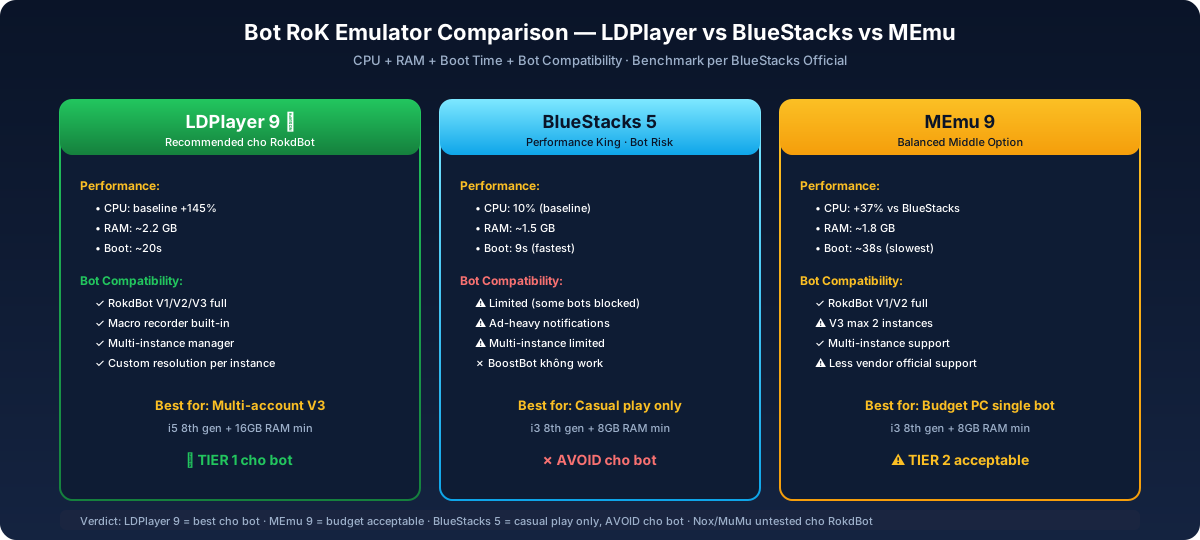
Per BlueStacks official benchmark:
| Emulator | CPU Usage | RAM Usage | Boot Time | Bot Compat |
|---|---|---|---|---|
| BlueStacks 5 | 10% (baseline) | ~1.5 GB | 9 giây | Limited (some bots blocked) |
| LDPlayer 9 | +145% CPU | ~2.2 GB | +122% (~20s) | Best (macro + recorder + multi-instance) |
| MEmu 9 | +37% CPU | ~1.8 GB | +322% (~38s) | Good (multi-instance support) |
| Nox Player | +37% CPU | ~1.9 GB | Slow | Mediocre |
Key insight: BlueStacks fastest performance nhưng limited bot compatibility. LDPlayer slower nhưng best cho automation — macro/operation recorder built-in.
Detailed Comparison Per Emulator
LDPlayer 9 — Recommended cho RokdBot (Best Compatibility)
Pros:
- ✓ Multi-instance manager (run 2-4 emulator parallel cho multi-account)
- ✓ Built-in macro recorder (manual fallback nếu bot config fail)
- ✓ Custom resolution per instance (RoK chạy 1280x720 optimal)
- ✓ Bot vendors (RokdBot, BoostBot) officially support
- ✓ Free, ad-supported nhẹ
Cons:
- ✗ +145% CPU vs BlueStacks (cần CPU 4-core minimum)
- ✗ +122% slower boot (~20s vs 9s BlueStacks)
- ✗ Update Android version slower (LDPlayer chạy Android 9 default, BlueStacks 11+)
Best for: chạy nhiều tài khoản (Siêu Cấp V3 hỗ trợ multi-account 2-3 tài khoản cùng lúc trong 1 gói), technical user.
Min PC specs: i5 8th gen, 16GB RAM, GTX 1060+
BlueStacks 5 — Performance King but Bot Risk
Pros:
- ✓ Fastest CPU usage (10% baseline)
- ✓ Latest Android version (11+)
- ✓ Auto-update + good UX
- ✓ 9s boot time
Cons:
- ✗ Some bot vendors không compatible (per BoostBot official: "BlueStacks does not work with the BoostBot Rise of Kingdoms bot")
- ✗ Ad-heavy (Promotional notifications)
- ✗ Multi-instance more limited
- ✗ Premium subscription cho some features
Best for: Single-account casual play, không recommend cho bot.
MEmu 9 — Balanced Middle Option
Pros:
- ✓ Lightweight (+37% CPU vs BlueStacks, less than LDPlayer)
- ✓ Multi-instance support
- ✓ Free, no premium tier
- ✓ Custom keymap
Cons:
- ✗ Slowest boot time (+322% vs BlueStacks ~38s)
- ✗ Less popular = fewer bot vendor official support
- ✗ Update cycle slower than competitors
Best for: Budget PC (8GB RAM), single bot account.
Min PC specs: i3 8th gen, 8GB RAM, GTX 1050+
RokdBot Compatibility Matrix
| Emulator | RokdBot V1 (Lohar) | RokdBot V2 (Gem + RSS) | RokdBot V3 (24/7 Full) | Premium VIP |
|---|---|---|---|---|
| LDPlayer 9 | ✓ Full | ✓ Full | ✓ Full (best) | ✓ Full |
| BlueStacks 5 | ✓ Partial | ⚠ Limited features | ✗ Not recommended | ✗ Skip |
| MEmu 9 | ✓ Full | ✓ Full | ⚠ 2 instances max | ⚠ Setup complex |
| Nox Player | ⚠ Untested | ⚠ Untested | ✗ Skip | ✗ Skip |
Verdict: LDPlayer 9 là tier 1 cho RokdBot. MEmu acceptable cho V1/V2. Avoid BlueStacks + Nox cho bot.
🤖 Setup RokdBot với LDPlayer < 10 phút: download LDPlayer → install RoK trong emulator → login Lilith → run RokdBot client → wizard config. Telegram support remote-assist nếu kẹt. Xem packages →.
PC Specs Min Theo Bot Tier
Single Account Bot V1/V2 (1 emulator instance)
| Component | Min | Recommended |
|---|---|---|
| CPU | i3 8th gen / Ryzen 3 | i5 10th gen / Ryzen 5 |
| RAM | 8 GB | 16 GB |
| GPU | GTX 1050 | GTX 1060+ |
| Storage | 30 GB SSD | 50 GB SSD |
| OS | Windows 10 64-bit | Windows 11 |
Chạy Nhiều Tài Khoản (2-3 instances parallel — V3 multi-account trong 1 gói)
| Component | Min | Recommended |
|---|---|---|
| CPU | i5 10th gen / Ryzen 5 | i7 12th gen / Ryzen 7 |
| RAM | 16 GB | 32 GB |
| GPU | GTX 1060 | RTX 3060+ |
| Storage | 100 GB SSD | 200 GB SSD |
| OS | Windows 11 | Windows 11 Pro |
Per Database Mart GTX 1650 article:
"GTX 1650 với 16GB RAM handle 2-3 Rise of Kingdoms instance comfortably"
Premium VIP / setup nhiều instance (3-4 đạo multi-instance)
- CPU: i9 13th gen / Ryzen 9
- RAM: 64 GB
- GPU: RTX 4060 Ti+
- Cloud VPS option: Android VPS hosting — 800-1.500K VND/tháng
Setup Workflow — RokdBot + LDPlayer (Recommended)
Step 1: Download LDPlayer
- Site: ldplayer.net (chính chủ)
- Version: LDPlayer 9 (latest stable)
- Install path: SSD ổ C: hoặc D: (NOT HDD — slow loading)
Step 2: Configure LDPlayer instance
- Open LDPlayer Multi-Instance Manager
- Create instance "RokdBot_Main"
- Settings:
- Resolution: 1280x720 (RoK optimal)
- CPU: 2 cores allocated
- RAM: 4 GB
- Android version: 9 (default OK)
Step 3: Install Rise of Kingdoms
- Open Google Play in LDPlayer
- Login Google account
- Install "Rise of Kingdoms"
- Login Lilith account (Facebook hoặc email)
- Tutorial complete trước khi run bot
Step 4: Install RokdBot Client
- Pay VietQR via packages
- Receive download link via Telegram
- Install RokdBot client (.exe) trên Windows host (NOT trong emulator)
- RokdBot auto-detect LDPlayer instance
Step 5: Configure Bot Wizard
- Open RokdBot client
- Select LDPlayer instance "RokdBot_Main"
- Toggle features: Lohar grind / Gem mining / RSS gather (theo tier subscription)
- Set schedule (24/7 hoặc time-bound)
- Click "Start Bot"
Total time: 10-15 phút (lần đầu). Subsequent restarts: 1 phút.
Multi-Instance Setup Cho Nhiều Tài Khoản (V3 multi-account 2-3 acc/gói)
LDPlayer Multi-Instance Manager:
- Create 2-3 instances: "RokdBot_Main", "RokdBot_Farm1", "RokdBot_Farm2"
- Each instance: independent Lilith account login
- Allocate CPU/RAM proportional (16GB RAM = 4GB per instance × 3 + 4GB host)
- Run all 3 simultaneously
Config RokdBot cho nhiều tài khoản (Siêu Cấp V3 hỗ trợ multi-account 2-3 tài khoản cùng lúc trong 1 gói):
- V3 điều khiển 2-3 instance trong cùng 1 gói
- Assign vai trò: Main = combat/honor, Farm1 = gem mining, Farm2 = RSS gather
Sai lầm phổ biến
Sai lầm 1: Dùng BlueStacks vì "nhanh nhất"
Performance fast nhưng bot compatibility limited. Wasted 900K subscription nếu bot không work.
Sai lầm 2: Allocate full CPU/RAM cho emulator
8GB RAM full cho LDPlayer = host Windows crash. Always leave 4GB+ cho OS.
Sai lầm 3: HDD storage thay vì SSD
HDD load RoK ~2 phút vs SSD ~15 giây. Bot timeout possible. Upgrade SSD trước khi bot.
Sai lầm 4: Skip emulator multi-instance setup
Chạy nhiều tài khoản cần multi-instance — V3 hỗ trợ 2-3 tài khoản cùng lúc trong 1 gói. Manual switch single instance = mất lợi thế chạy song song. Use Multi-Instance Manager.
Sai lầm 5: Run emulator trong VPS rẻ tiền
Cloud VPS 200K/tháng rẻ thường shared CPU = lag bot. Dedicated VPS 800K+ hoặc local PC tốt hơn.
Tổng kết — Quick Recommendation
Nếu mày là:
- F2P PC trung bình (i3/i5, 8GB RAM): LDPlayer 9 + RokdBot V2 (900K)
- Chạy nhiều tài khoản: LDPlayer 9 multi-instance + RokdBot V3 (1.2M — multi-account 2-3 tài khoản cùng lúc trong 1 gói)
- Whale top alliance: Dedicated VPS Windows + LDPlayer + Bot Premium (3M)
- Casual single account: MEmu 9 + RokdBot V1 (750K)
Avoid: BlueStacks 5 (bot incompatibility), Nox Player (untested), MuMu Player (Chinese-only support thường).
Đọc tiếp:
- Kéo Man Rợ Thuê RoK 2026 — RokdBot Service Catalog
- Bot RoK Comparison RokdBot vs KOJI vs RokTop
- Bot vs BlueStacks Macro Comparison RoK
- Mobile vs PC RoK Comparison 2026
Sources
- BlueStacks vs LDPlayer vs MEmu vs Nox benchmark — BlueStacks Official
- 4 Easy Steps To Play RoK On PC — BoostBot
- Download Rise of Kingdoms LDPlayer
- GTX 1650 Multi-Instance RoK — Database Mart
- Playing RoK on PC Guide — AirDroid
- Android VPS Server Emulator Hosting — Cloud Clusters
Disclaimer: Bot compatibility cho từng emulator dựa trên RokdBot internal testing + official docs từ BoostBot (cùng category bot). Compatibility có thể change theo emulator update.